Free
$0
- 1 workspace
- 2 GB storage
- Up to 3 people, clients included
- The hub, MCP server and agent skill
Claude Code, Codex and Antigravity run plain-language test flows on the iPhones and Android phones connected to your Mac: by USB, on your Wi-Fi, or away from home. Every run uploads with its video, the failing frame and the build it ran on: proof you can send a client.
curl -fsSL https://proofsheet.dev/install.sh | shOn the Mac your phones connect to: Apple Silicon, macOS 26 or later. The hub, its MCP server and the agent skill are free.
Start freeFree: $0, 2 GB storage, up to 3 people.
Get a beta inviteProofsheet is in private beta. Already invited? Sign in.
Coding agents write a feature in minutes. Checking it still takes a person, a phone and a screen recording. Proofsheet hands the phones to the agent and keeps what it saw.
The hub runs on the Mac your phones connect to, and signs in to your team's workspace once.
Links the repo, writes an example flow and adds the proofsheet skill and MCP server for your agent. Doctor checks adb, Xcode, your Apple team and the phones, with the fix for each.
The agent runs the flow on each free phone and the run uploads to your workspace when it finishes.
Reads the flow in your repo and drives the phones through the proofsheet MCP server and skill.
Streams every screen live, gives each phone to one agent at a time, and records each run with its video and logs.
On your desk, on your Wi-Fi, or away from home on another network.
Keeps every run: the verdict, the failing frame, the video, the build and the commit.
Signs in with an emailed code and comments on a step or a moment in the video.
The Device Hub is the free Mac app behind every run. The Proofsheet app, on the Mac, iPhone, iPad or Android, shows each phone's screen as it happens, lets you drive any of them by hand, and shows which agent holds which phone.
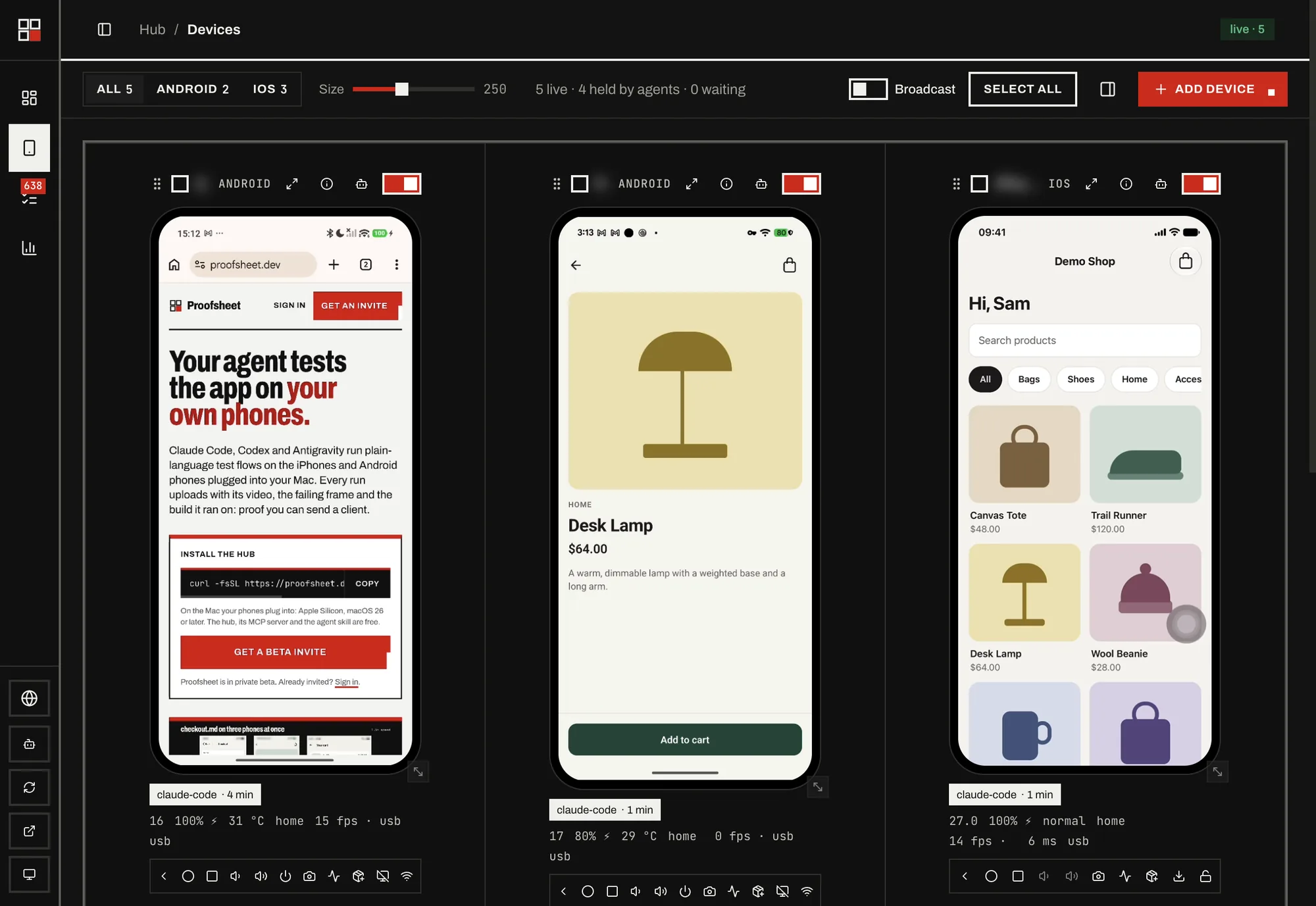
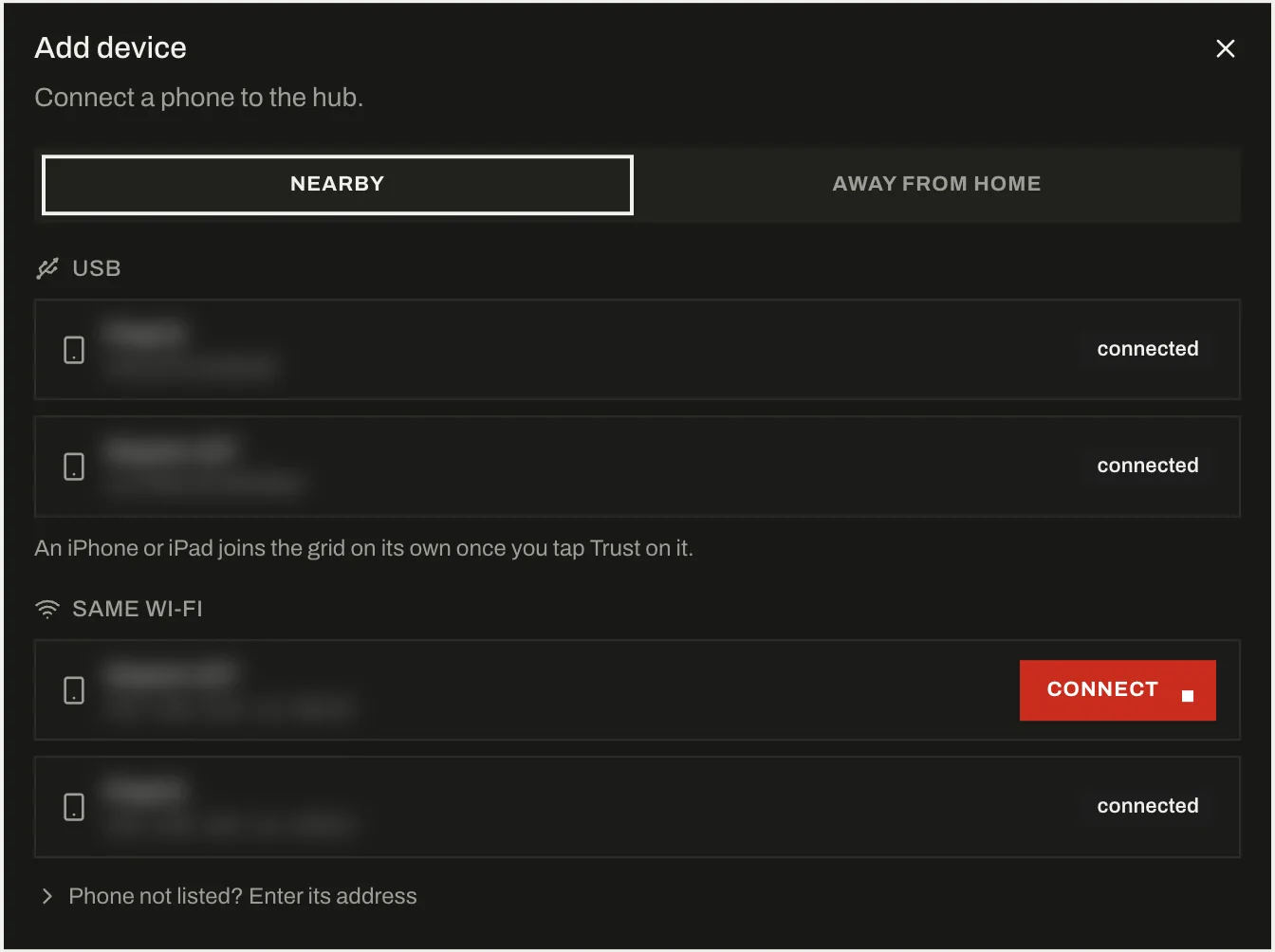
An Android phone with USB debugging on, or an iPhone or iPad once you tap Trust. It joins the wall on its own.
Android: turn on Wireless debugging and pair it with the six-digit code in Add Device. iPhone and iPad: once paired by USB, they also join over the same Wi-Fi, and their screen and sound stream through the Proofsheet app.
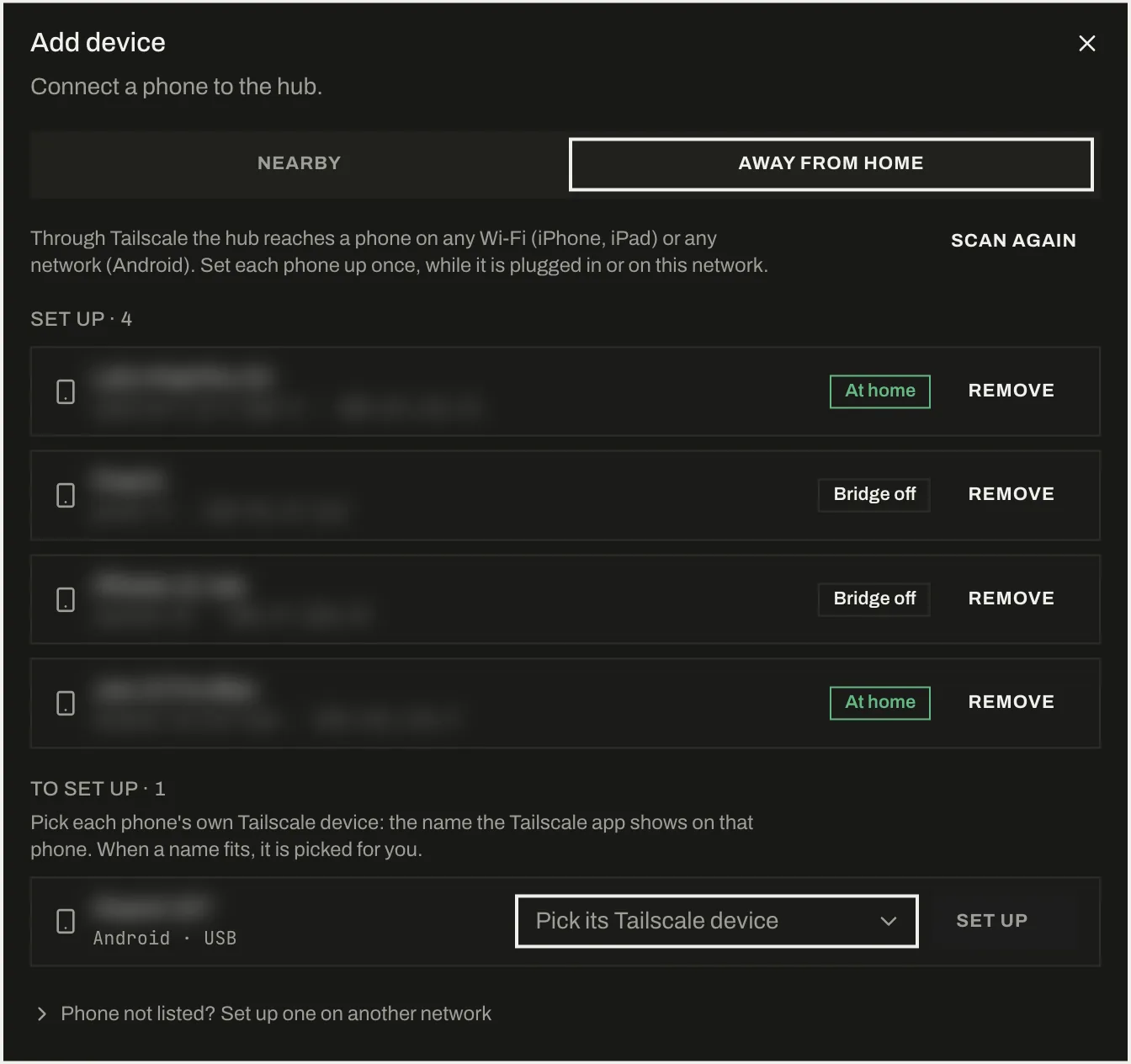
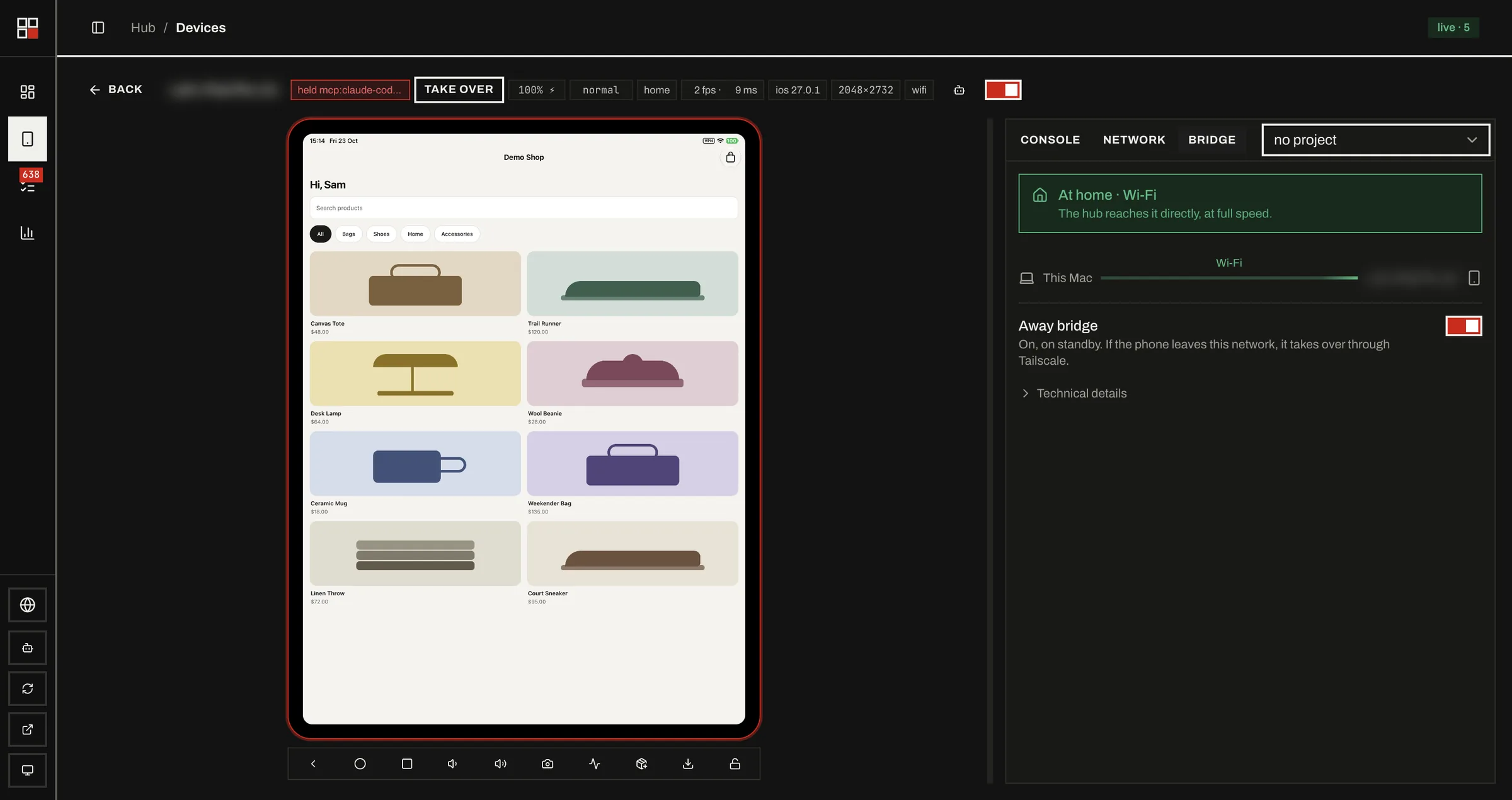
Set a phone up once while it's home. When it leaves, the away bridge carries it through Tailscale: an iPhone or iPad on any Wi-Fi, an Android phone on any network. Agents and runs use it like a phone on the desk.
The phone you open streams in H.264 at up to its own resolution and 60 fps, by USB or Wi-Fi. Quality steps down when the link slows and back up when it recovers; wall tiles stream lighter, so many phones stay smooth.
Tap, swipe and hold on its screen. On the Mac, click, drag, scroll with the trackpad and right-click for a long press. Home, Back, volume and lock keys, screenshots, and unlock with the saved passcode.
Copy on the Mac and paste on an Android phone, or the other way round: text and images up to 100 MB, with no app on the phone.
Drop an .ipa, .apk or .aab on a phone. An IPA signed for the App Store, TestFlight or another team's phones is re-signed for that phone first, as Sideloadly does, and can sit beside the store version. The toast shows upload, signing and install.
Each phone serves one agent or run at a time; the rest queue. Every tile shows who holds it and for how long. Take over hands it to you, and Manual keeps agents off a phone you test by hand.
Each phone's log in its Console pane, filtered by app, level or pattern. Add one interceptor to your debug build and the Network tab lists each API call: no proxy, no certificate, pinning stays on.
Proofsheet.app keeps the hub running and starts at login. Its panel lists every phone and its state, turns phones or a whole platform on and off, runs each phone's away bridge, and opens any phone in the app.
The Proofsheet app shows the same pages everywhere. Add your hub on any device on your tailnet, and watch the stats: run verdicts, phone time held by agents and every agent tool call.
Read the Device Hub guide: connecting phones, the away bridge, installs, the shared clipboard, the menu bar and the apps.
---
app: { ios: com.example.shop, android: com.example.shop }
---
# Checkout with a saved card

1. Open the app signed in as the test shopper
2. Add the first product to the cart
3. Pay with the saved card
4. Expect the receipt with the order total
proofsheet e2e run checkout replays it on any phone, and your agent fixes the flow when the app changes.Every run reads in the order you need it: the verdict, the failing frame, what was expected against what the phone showed, then the video, device, OS, app build, branch and commit.
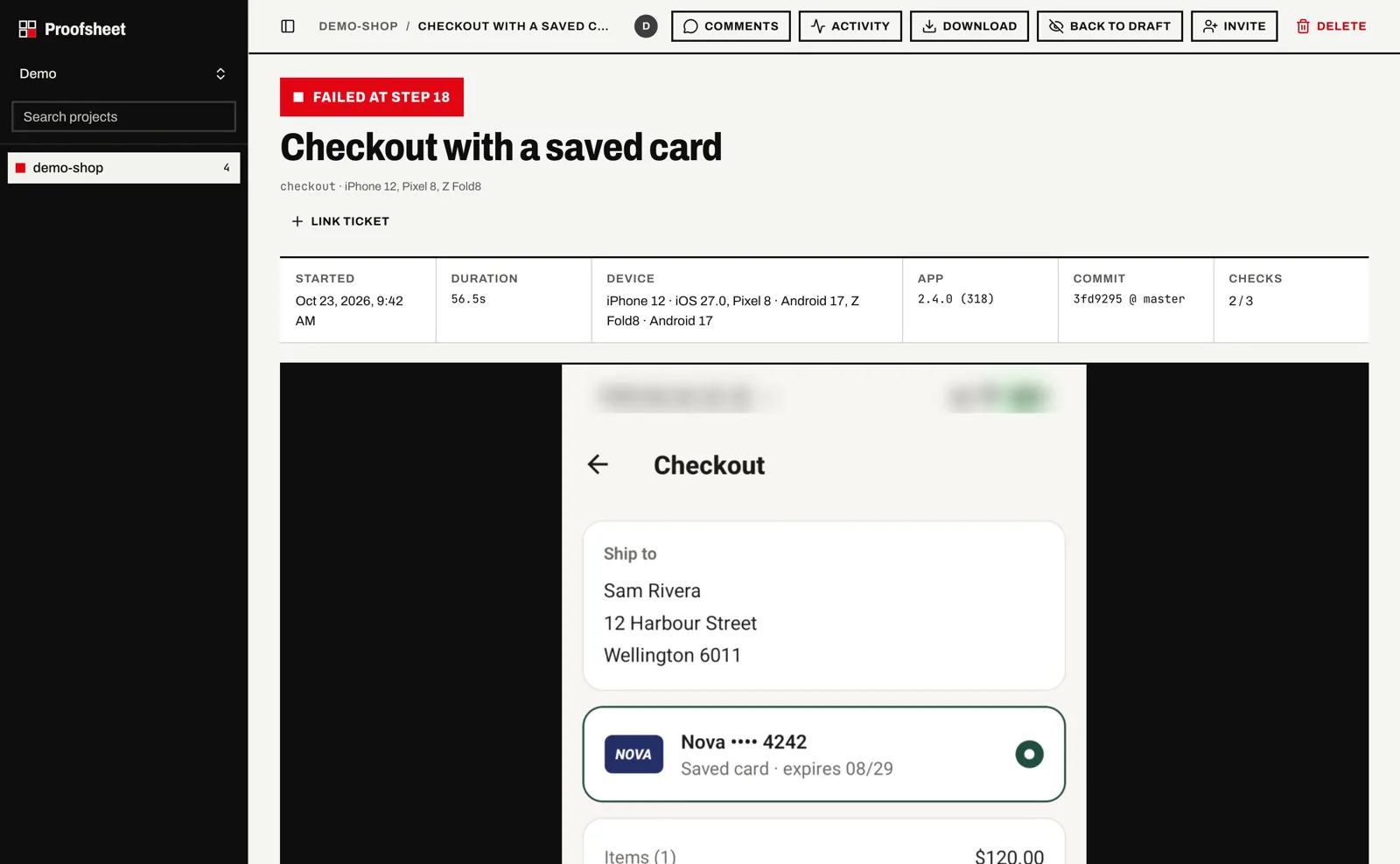
Invite a client by email to one project, or to every project of theirs. They sign in with an emailed code, see only the published runs you gave them, and pin comments to a step, a screenshot or a moment in the video. Branch and commit stay hidden from clients unless you show them.
Each team works at yourteam.proofsheet.dev. Projects group under clients, and a viewer sees only the clients and projects given to them.
One person can belong to several workspaces. Switching is a link to another address.
Payments and invoices by Polar.
Charged in blocks above the 20 GB included. Storage counts every uploaded report, screenshot and video.
An Apple Silicon Mac with macOS 26 or later, the phones and their cables, a coding agent (Claude Code, Codex or Antigravity) and Node.js. Android phones need adb. iPhones need Xcode and an Apple developer team, set once with proofsheet ios setup. proofsheet doctor tells you what is missing and how to fix it.
No. An Android phone can join over Wi-Fi with Wireless debugging, and an iPhone or iPad joins over the same Wi-Fi once it has been paired by USB. A phone you set up once in Add device can then be reached away from home through Tailscale: an iPhone or iPad on any Wi-Fi, an Android phone on any network. You need Tailscale only for phones away from home.
Web flows are coming. Today Proofsheet runs flows on iPhone and Android phones and tablets.
We don't rent devices. You use the ones on your desk and pay for storage, not for devices, minutes or parallel runs.
Proofsheet runs on real hardware, and each run is a record you can open and send, not a terminal log.
Your app builds and test data stay on your Mac. When a run finishes, its report, screenshots, video and logs upload to your workspace.
An email invite. They sign in with a code sent to that email and see only the projects you gave them. On Free, clients count toward the 3 people; on Pro there is no limit.
Every uploaded report, screenshot and video. On Free, uploads stop at 2 GB until you delete runs or upgrade. On Pro, storage above the 20 GB included is billed in blocks, up to 100 GB; ask support to go past that. Deleting runs frees their storage.
Polar takes the payments and sends the invoices. Pro is billed per workspace each month, and you can cancel from Billing in your workspace.